AI Agents in SMEs and Craft Businesses:
What Really Works?
A practical guide with concrete examples, realistic costs, and a step-by-step guide to getting started with AI automation
Monday, 7:30 AM. You arrive at the office and your inbox is overflowing. Three customer inquiries for quotes, two follow-up questions about ongoing projects, a complaint about a delayed delivery. Plus, the phone is ringing.
Before you can even start working, two hours are gone. Just for emails and phone calls.
Now imagine: The three quote requests were processed overnight. The quotes are ready in the system, with correct prices from your calculation. You just need to review them and click Send.
This is not science fiction. This is what AI agents in craft businesses and SMEs can already do today. The only question is: Is it worth it for your company? And how do you get started without spending a fortune?
What is an AI agent and how does it differ from ChatGPT?
Before we talk about costs and benefits, we need to clarify what we actually mean. Because “AI agent” is used for all sorts of things: from simple chatbots to fully automated systems.
Definition: What is an AI Agent?
An AI agent is an autonomous system based on artificial intelligence that pursues a defined goal, makes independent decisions, and executes actions. Not every step needs to be manually specified. Unlike a chatbot, an AI agent does not wait for your questions, but works proactively: It can read emails, retrieve data from systems, create documents, and send them.
The distinction is important because it determines what you can expect:
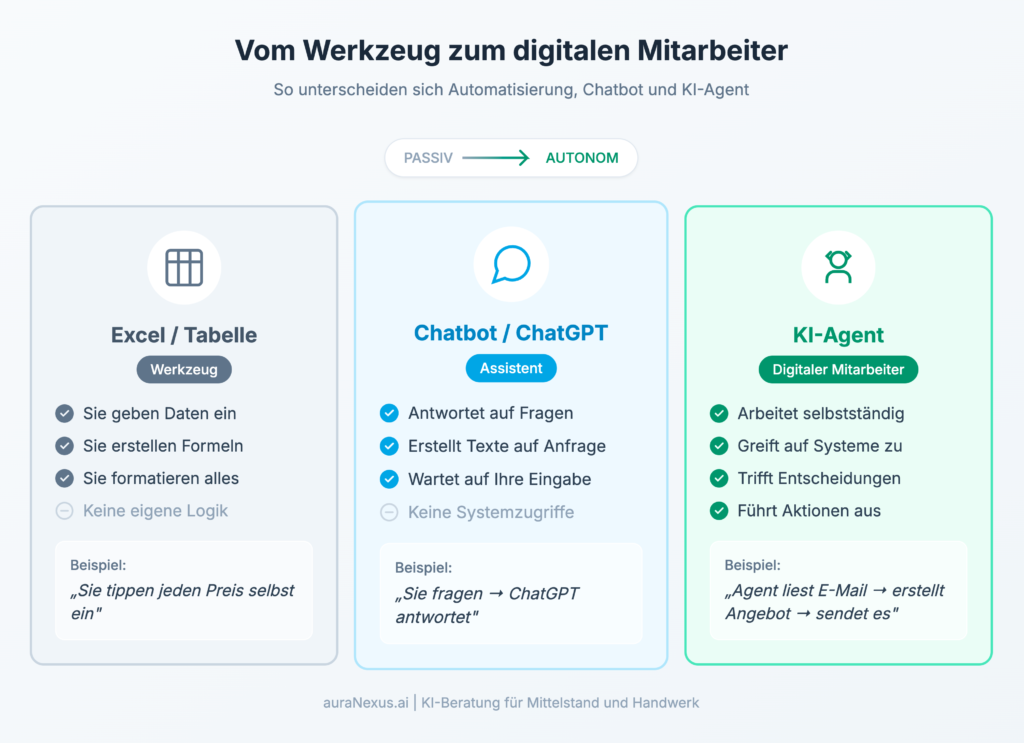
The crucial difference: an AI agent understands the goal and finds its own way to achieve it. It can access your emails, retrieve data from your system, make decisions, and execute actions. You don’t have to specify every step.
Sounds like science fiction? It’s not. But it’s also not a panacea. Let’s take a look at where artificial intelligence in craft businesses really works.
What do the studies say? Proven figures on AI usage in 2025
Before we get into the practical side, let’s take a look at what is scientifically proven. The good news: There are now several current studies specifically on German SMEs from 2025.
Current study results on AI usage (2025)
- KARL study by Karlsruhe University of Applied Sciences (May 2025): 40% of the SMEs surveyed are already using AI, with a further 21% planning to use it in the near future. Larger SMEs (250–500 employees) use AI most frequently at 49%.
- AI Index Mittelstand 2025 (DMB/Salesforce): One third of companies use AI, 73% of which use generative AI. Particularly interesting: 10% are already gathering initial experience with AI agents.
- KPMG “Generative AI in the German Economy 2025”: 69% of the companies surveyed already have an AI strategy, 72% are planning to increase their AI investments.
- Grant Thornton B2B Study (March 2025): 75% of SMEs state that AI influences their corporate strategy. 36% prioritize increasing efficiency as their top goal.
- Mittelstand Digital AI Study 2025: 86% of SMEs recognize the relevance of AI. However, only 32% have a well-developed AI strategy, and only 2% are already using AI operationally.
Important to know: The studies show a clear gap between recognition and implementation. According to Grant Thornton, 31% of SMEs do not have enough AI specialists, 29% see challenges in implementation. The key is to define in advance what you want to achieve and measure the result.
3 Practical Examples: How Craft Businesses Use AI Agents
The following examples come from our consulting practice. The figures are results that we have measured together with our customers.
Practical Example 1: AI Agent for Email Management in a Painting Business
The Situation: A painting business with 12 employees receives 15–20 inquiries per email and contact form every day. The boss spends two hours every morning sifting through inquiries, asking follow-up questions, and coordinating site visit appointments.
The Solution: An AI agent reads incoming inquiries, categorizes them (new customer, existing customer, urgency), automatically asks follow-up questions if information is missing, and suggests suitable dates for the site visit. The appointment suggestions are based on the calendar and the customer’s postal code.
The Result: The daily email time decreased from 2 hours to 20 minutes. The boss only has to confirm the prepared appointments and process special cases. Customers receive an answer within minutes instead of hours.
Investment: approx. €250/month (Make.com + ChatGPT API) plus a one-time setup fee of €2,500.
Practical Example 2: Automatic Quote Creation in an HVAC Business
The Situation: An HVAC business creates an average of 30 quotes per month. Each quote takes 45–60 minutes: checking dimensions, calculating materials, estimating labor time, typing everything into the template.
The Solution: The business photographs the construction site, uploads the images and a short description. The AI agent analyzes the images, suggests material quantities, calculates based on the stored prices, and creates a draft quote.
The Result: The quote time decreased to 15 minutes per quote, mainly for the final review. With 30 quotes per month, this saves around 20 hours. In addition, the quotes go out faster, which has increased the closing rate.
Investment: approx. €350/month (n8n Cloud + Claude API + image analysis) plus a one-time setup fee of €3,500.
Practical Example 3: AI Knowledge Management in Mechanical Engineering
The Situation: A mechanical engineering company with 80 employees has documentation in SharePoint, technical drawings in the CAD system, maintenance instructions as PDFs, and experiential knowledge in the heads of the older colleagues. New employees need months to find their way around.
The Solution: A RAG-based knowledge platform was connected to all documents. Via pre-configured micro-apps in the intranet, employees can ask questions such as “How do I change the bearing on machine XY?” and receive rights-checked answers with reference to the original documentation. No prompt knowledge required: The input masks lead to the result. The platform runs GDPR-compliant on-premises.
The Result: The training time for new employees decreased by an estimated 40% according to the company. Experienced colleagues are interrupted less often with routine questions. And the knowledge of departing employees is now systematically available.
Investment: approx. €600/month (enterprise solution with RAG and micro-apps) plus a one-time setup fee of €8,000 and document preparation.
From ChatGPT to Enterprise Platform: The Next Level
The practical examples show a clear trend: The greater the benefit, the more important the integration into existing systems and the ease of use for all employees.
Here are two concepts that make the difference between “nice experiment” and “real productivity gain”:
RAG (Retrieval Augmented Generation): The AI not only draws on its general knowledge, but also searches your company documents and provides answers with source references. This creates rights-checked answers from your own data, not from the internet.
Micro-Apps: Instead of free text input (prompting), employees use pre-configured input masks for typical tasks. Example: “Compose email” with fields for recipient, occasion, and tonality. The result: AI support without prompt knowledge.
Typical Micro-Apps in Practice:
| Intended Use | Examples | Result |
|---|---|---|
| Communication | Email Generator, Reply Assistant | Ready-to-Send Drafts |
| Text Creation | Article Outlines, Social Posts, Presentation Planner | Structured Text Modules |
| Analysis | Document Summary, Contract Analysis | Clear Evaluations |
| Knowledge Management | FAQ Bot, Onboarding Assistant | Instant Answers from Internal Sources |
The advantage: These platforms can be operated in compliance with GDPR, on-premises or in the cloud. Your company’s security and compliance policies apply as usual.
What does an AI agent cost for craft businesses and SMEs?
Now it gets concrete. Because the best examples are useless if the costs outweigh the benefits.
The good news: Getting started with AI automation for companies is cheaper than most people think. The bad news: Those who start too cheaply are giving away potential.
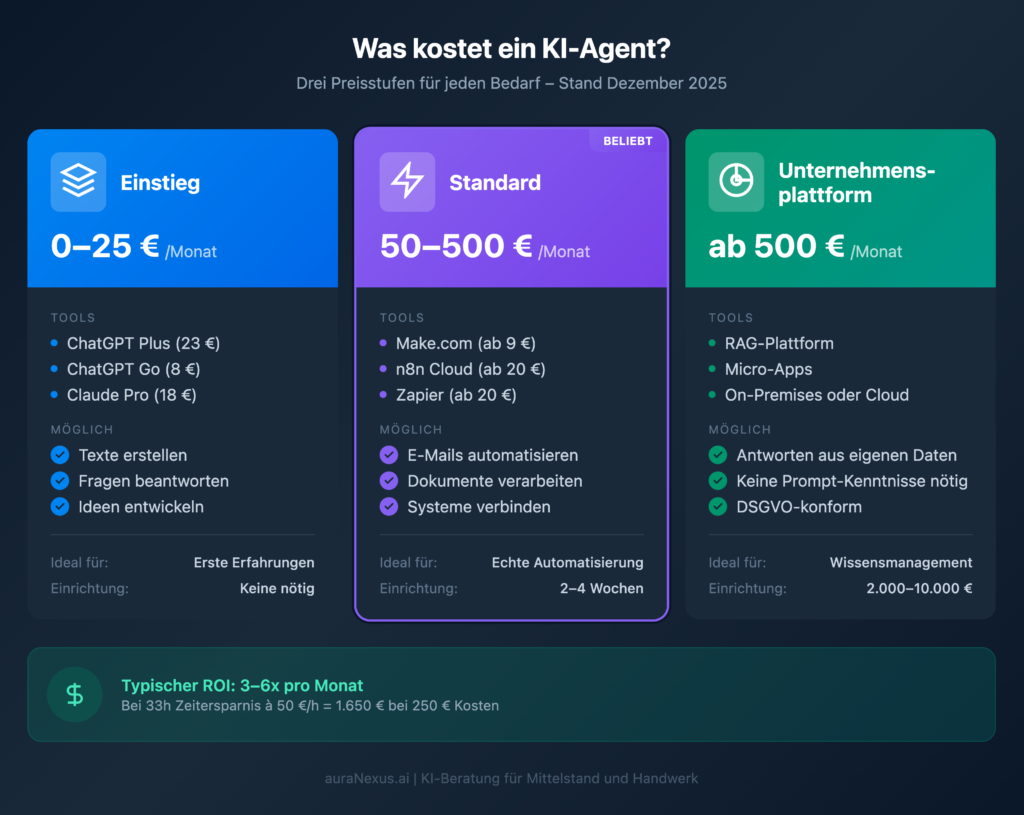
Cost Overview: AI Agents by Price Range (as of December 2025)
Level 1 – Entry (0–25 €/month): ChatGPT Plus currently costs €23/month in Germany. Claude Pro is around €18–20/month. New since December 2025: ChatGPT Go for only €8/month as an intermediate step. With this, you can gather initial experience, create texts, and manually support processes. No programming required.
Level 2 – Standard (50–500 €/month): Automation platforms such as Make.com (from €9/month), n8n Cloud (from €20/month, self-hosted free of charge) or Zapier (from ~€20/month) plus API costs for AI models. This is where real automation begins: emails are automatically processed, documents processed, leads qualified.
Level 3 – Individual (from 500 €/month + setup): RAG-based platforms with micro-apps, own servers, and comprehensive training. Here, the AI works with your company data, rights-checked and GDPR-compliant. One-time setup costs typically range between €2,000 and €10,000.
Example Calculation: Is the Investment Worth It?
Let’s take the example of the painting business from our practice:
- Time Savings: 1 hour 40 minutes daily
- With 20 working days: approx. 33 hours per month
- At €50/hour entrepreneur’s wage: €1,650 time saved
- Cost of the solution: approx. €250/month
Return on investment in this case: approx. 6x. For every euro invested, about 6 euros come back. And that every month after the setup phase.
Important: This calculation is a concrete example, not a promise. Your ROI depends on your specific process. Measure beforehand what the process costs today. Only then can you say afterwards whether the investment was worth it.
When is an AI agent not worth it?
This section is missing in most articles about AI. But it is important because not every process is suitable for automation.
An AI agent is probably not worth it if:
- The process rarely occurs: If you only write three quotes a month, automation is not worth it. Rule of thumb: The process should occur at least weekly.
- Every case is completely different: If your work mainly consists of creative individual solutions, automation helps little. AI needs patterns.
- The data is missing: If your prices only exist in the boss’s head and customer data is in ten different Excel files, you must first create order.
- No one has time to take care of it: An AI agent needs attention for fine-tuning and feedback at the beginning. If everyone is overloaded, the project will fizzle out.
Be realistic. It is no shame to say: “Our company is not ready for that yet.” Better than burning money on a project that doesn’t work.
Introducing AI Agent: Step-by-Step Guide
You don’t have to invest thousands of euros right away. The best way to get started with using AI in craft businesses is small and low-risk.
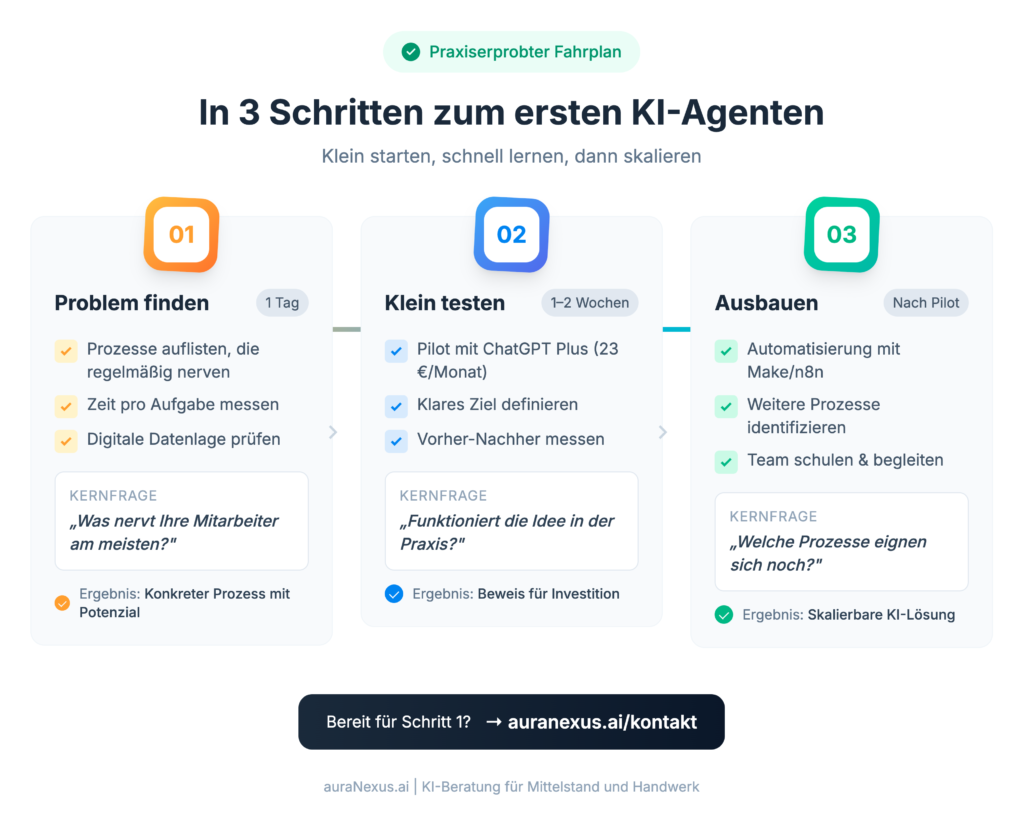
Step 1: Find the Right Problem (1 Day)
Not every problem is suitable for AI. Look for tasks that:
- Occur regularly (at least weekly)
- Follow a similar pattern
- Are time-consuming but not particularly demanding
- Are based on data that is available digitally
Practical Tip: Ask your employees: “What annoys you the most?” Often the best automation candidates are where someone gets annoyed every day.
Step 2: Test Small (1–2 Weeks)
Don’t start with the most complex process. Choose a manageable area and set a clear, measurable goal:
- “I want to reduce the time for writing quotes from 60 to 20 minutes.”
- “I want to answer customer inquiries within 10 minutes, not after hours.”
- “I want new employees to be able to answer half of the questions themselves.”
A good first test costs little (ChatGPT Plus for €23/month or ChatGPT Go for €8/month is often enough) and lasts 1–2 weeks. If it doesn’t work, you have lost little. If it works, you know that a larger investment is worthwhile.
Step 3: Only Then Expand
Only invest more if the pilot was successful. Then you know:
- Which time savings are realistic
- Which problems arise
- Whether your employees can and want to work with it
- Which other processes are suitable
The 3 Most Common Mistakes When Introducing AI
Mistake 1: Starting with the Biggest Problem
It sounds logical: “If we’re going to introduce AI, then let’s do it right.” But that’s wrong. Complex processes have many exceptions, need a lot of data, and take a long time. It’s better to start with a small, clearly defined problem. Success motivates for the next step.
Mistake 2: No Success Measurement
If you don’t measure beforehand how long a process takes, you can’t prove afterwards that something has improved. This leads to discussions instead of decisions. Measure beforehand: time, errors, costs. Measure afterwards: time, errors, costs.
Mistake 3: Not Taking Employees Along
AI projects rarely fail because of the technology. They fail because no one uses the new system. Involve employees from the beginning. Explain that it’s about getting rid of annoying tasks, not cutting jobs.
Frequently Asked Questions About AI Agents in SMEs
What does an AI agent cost for small businesses?
The entry starts at €0–25/month with tools like ChatGPT Plus (€23), ChatGPT Go (€8) or Claude Pro (€18–20). For real automation with platforms like Make.com (from €9) or n8n (from €20 Cloud, self-hosted free of charge), expect €50–500/month. Individual solutions cost from €500/month plus one-time setup costs of €2,000–10,000.
What is the difference between ChatGPT and an AI agent?
ChatGPT is an assistant that answers your questions. An AI agent works independently: It can read emails, query systems, create documents, and execute actions. You don’t have to specify every step. The agent pursues a goal, ChatGPT waits for instructions.
How much time can I really save with AI?
According to IW Köln, the most frequently cited goal of using AI is to “free up routine tasks.” 84.5% of companies cite this as their main goal. With routine tasks, time savings of 50 to 70% are realistic. Important: The time savings depend heavily on the specific application. Measure before and after.
Which processes are best suited for AI automation?
According to the KARL Study 2025, AI is most frequently used in sales and marketing (15% to a high or very high degree). Well-suited areas include: quote creation, email answering, scheduling, document processing, invoice verification, and knowledge management.
Do I need IT knowledge to use AI agents?
Not to get started with ChatGPT or ready-made solutions. For individual automations, it is recommended to work with an AI consultant who will handle the technical implementation. No-code platforms like Make.com also enable non-technicians to build simple workflows.
What are RAG and Micro-Apps?
RAG (Retrieval Augmented Generation) means that the AI searches your company documents and provides answers with source citations, instead of relying only on general knowledge. Micro-apps are pre-configured input masks for typical tasks such as email creation or document summarization. The advantage: employees do not need any prompt knowledge, but simply select an app and fill out fields.
Is AI worthwhile for your business?
In 30 minutes, we’ll look at your processes together and identify where an AI agent would really save time and where not.
Post Tags :
Share :
AI agents for medium-sized businesses, AI in crafts, AI agents for crafts, AI automation for companies, automation for craft businesses, workflow automation for crafts, AI agent costs, Make.com automation, n8n workflow, automation ROI, AI agent practical examples, digital automation for crafts, artificial intelligence automation
More articles on this topic
AI in the skilled crafts. Practical examples of AI use in skilled crafts businesses and how to get started.
Individual instructions for AI. How to optimally use ChatGPT and Claude to achieve better results.
AI visualization for craft businesses. AI tools for visualizing projects – a practical application for craftsmen.
AI Governance thought pragmatically. How to introduce AI guidelines without stifling innovation.