
What can be seen, can be sold.
In landscaping, closing a deal rarely fails because of the price. It fails because customers cannot see the planned garden in front of them. auraVision provides the image, in four styles and, since May 2026, additionally in four lighting moods.
The customer nods. And still does not decide.
AI garden visualization refers to a process that generates a photorealistic image of the planned garden from a photo of the existing garden and a configuration. The process is primarily used in the consulting and quoting phase in landscaping and related industries.
A typical consulting meeting in landscaping lasts one to two hours. You walk through the garden with the family, listen, suggest solutions, and take notes. On the way back to the office, you have ten ideas in your head, a few measurements on your notepad, and the gut feeling that it was a good appointment.
Then the gap begins. You write a quote with items such as perennial and grass planting according to the planting plan, 42 m². The customer reads this, understands parts of it, but does not see the garden. They see an Excel list with amounts. The decision is delayed, or it is made against another offer in which a competitor has also included a quick sketch.
This is not a convenience problem, but a sales problem. Those who do not show what they mean during the consultation have a harder time selling. AI garden visualization closes exactly this gap. It transforms a description into a shared vision.
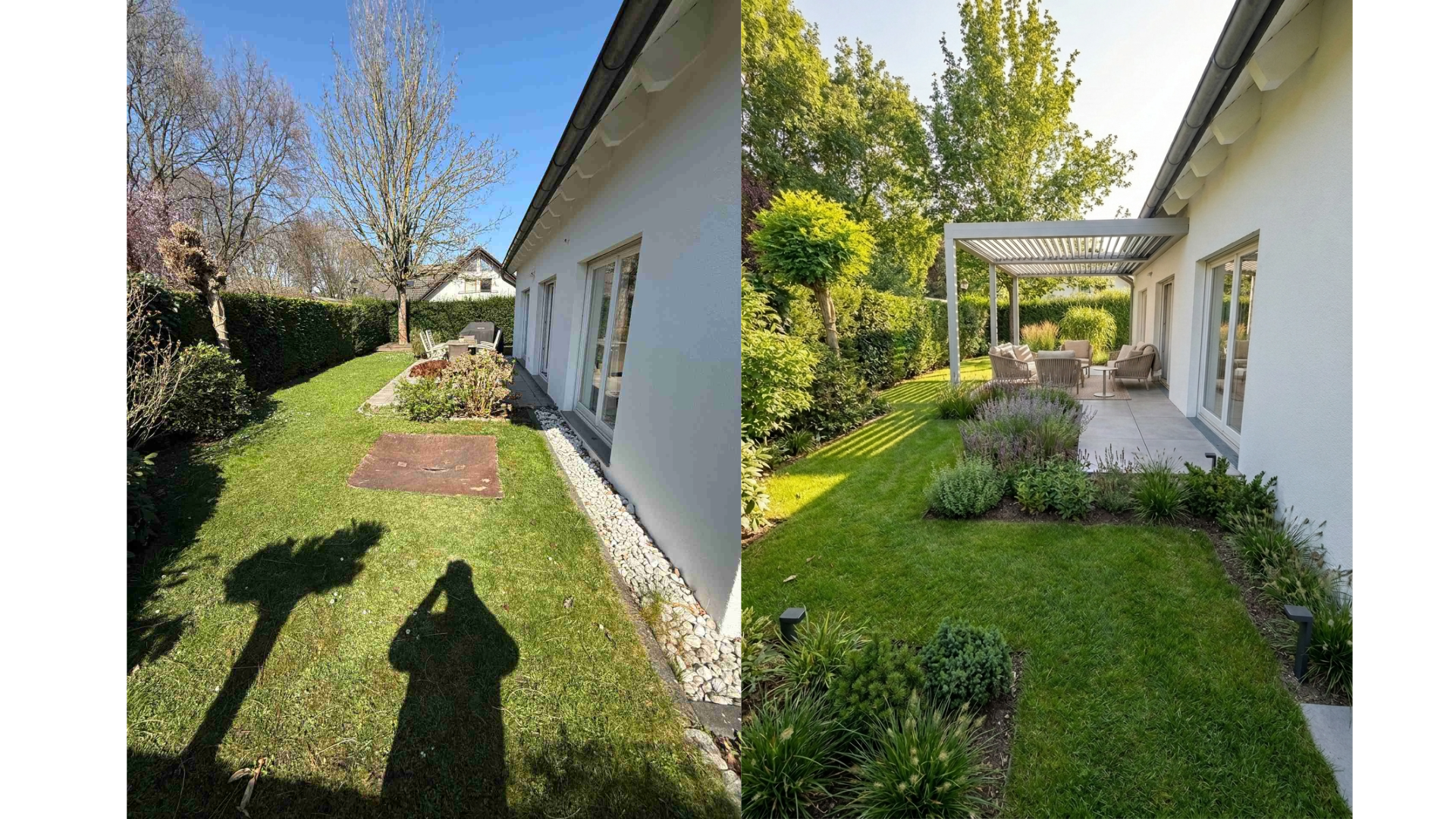
from Modern to Natural
from the front garden to the terrace
Day, Night, Summer, Winter
A visual bridge between the appointment and the order.
auraVision starts in the sales process exactly where words and sketches have stood until now. You upload a photo of the garden, select an input mode, a style, and the areas the garden should have. A photorealistic image of the planned garden is created from this configuration.
Unlike generic image generators, auraVision is tailored to the sales situation in landscaping and related industries. Styles, areas, and material options are prepared exactly as you actually need them in a customer meeting. A louvered pergola is called a louvered pergola, a wooden deck looks like a wooden deck.
The decisive added value does not arise from the image alone. It arises from the conversation that results from it. As soon as your customer sees several variants of their own garden in front of them, they no longer talk about square meters, but about preferences. About the pergola or the clear view of the meadow, about floor spots or bollard lights, about louvered fences or hedges.
Three ways to the image. Three consulting situations.
Not every conversation needs the same level of detail. Some customers want inspiration, others come with clear ideas. auraVision distinguishes between three input modes so that you can choose the appropriate path for each appointment.
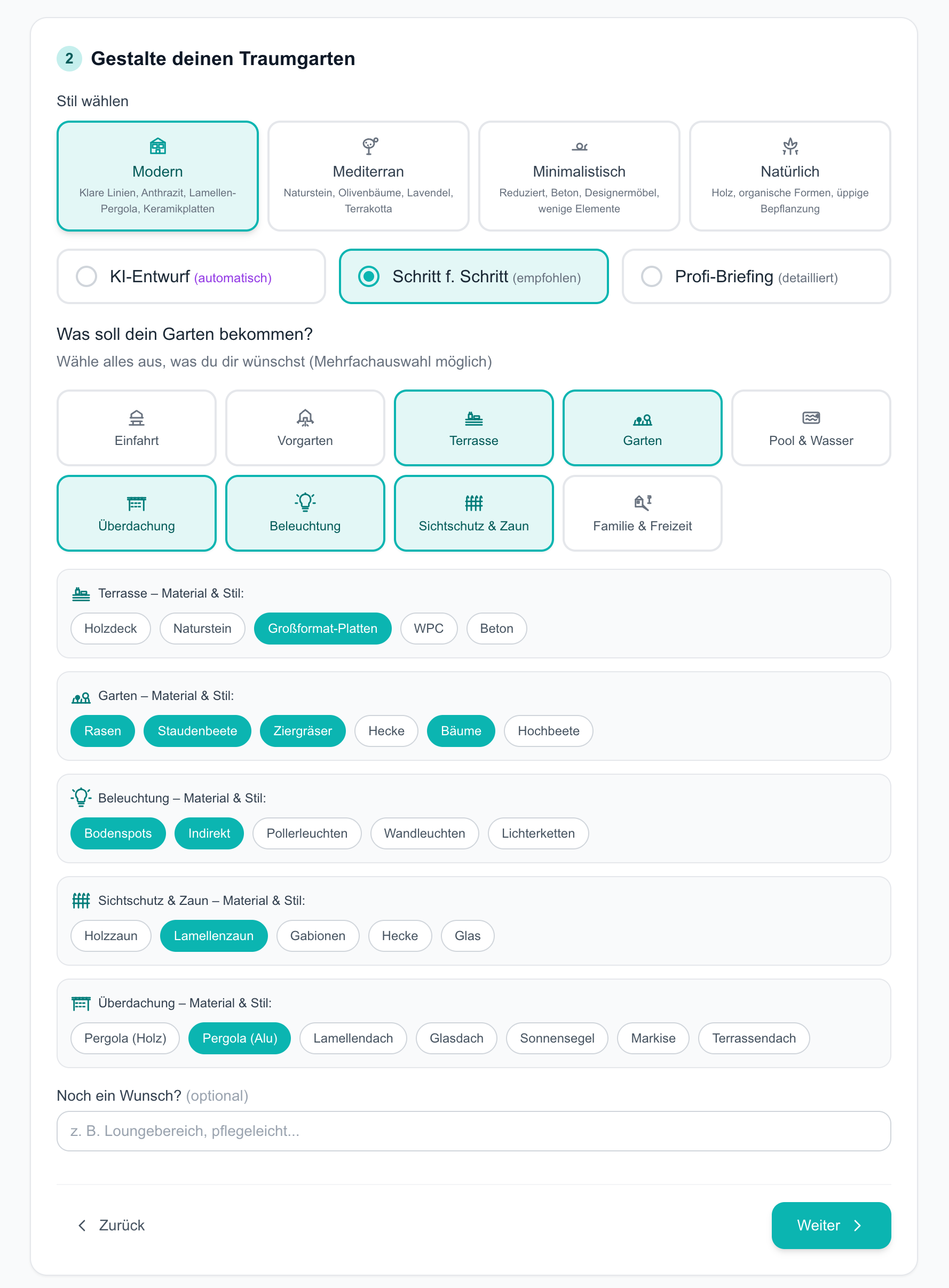
Four styles. One common language.
Each style is a combination of materials, furniture, and planting logic. In the consultation, you choose two or three styles and discuss together on the screen what feels natural to the customer.
Nine areas. Material at the touch of a button.
A garden is the sum of its areas. auraVision structures the configuration along these areas and offers suitable material options for each area, so that you can become specifically concrete in the conversation.
The first impression
Paving, edging, and planting options for the area between the street and the house.
Representation and maintenance effort
Front garden concept between classic and low-maintenance. The area that welcomes neighbors and guests.
Outdoor living room
Wooden deck, natural stone, large-format tiles, WPC, or concrete. Material and format shape the entire appearance.
Planting concept
Lawn, perennial beds, ornamental grasses, hedges, trees, raised beds. The mix determines maintenance effort and seasonality.
Water surfaces
Pool, swimming pond, water feature, or fountain, each with suitable edging and surrounding design.
Weather and shading
Wooden pergola, aluminum pergola, louvered roof, glass roof, sun sail, awning, or terrace roof. Shading and weather protection with a clear material effect.
Atmosphere in the evening
Floor spots, indirect lighting, bollard lights, wall lights, or string lights. Makes the garden usable from dusk onwards.
Privacy
Wooden fence, louvered fence, gabions, hedge, or glass. Shapes the outer edge and thus the perceived garden form.
Everyday use
Play areas, sports surfaces, raised beds, and other usage elements that the garden needs in the family's everyday life.
Four moods. One garden.
A garden is not one image, but many. It looks different at noon than in the late evening, different in July than in November. Those who only show one variant in a consultation ignore a large part of the reality of use. Since May 2026, auraVision has therefore generated four mood variants of the same garden in identical geometry upon request.
Why identical geometry is the crucial point
The four moods are not four new images. They are four weather versions of the same image. The terrace remains in the same place, the pergola has the same dimensions, the apple tree stands at the same angle. This geometric consistency is the difference from generic image generators, where every new request creates a different garden.
Use in the sales conversation
In practice, we recommend starting with the summer day variant and opening two further moods depending on customer interest. Families are often interested in the summer vegetation, wellness customers in the evening lighting, and buyers in higher altitudes in the winter effect. The mood follows the question, not the sequence.
One tool. Multiple sales conversations.
Private customers
From appointment to signature
Owners make design decisions for several decades. The step from wish to order needs an image. auraVision delivers it directly on-site on the tablet, in the appropriate style and desired lighting mood.
Wellness Gardens
Pool in your own environment
A pool is a significant investment. Those who see it in their own garden, by day and in the evening with lighting, no longer ask "does this fit in here?", but rather "we'll take natural stone or wood for the edging."
Spa Facilities
Preparing investment decisions
Hoteliers and spa operators justify investment decisions to owners or banks. A visualization of the planned outdoor facility in several styles and moods replaces the imagination gap and accelerates approvals.
Citizen Participation
Making plans understandable
In neighborhood or schoolyard redesigns, understandable images are crucial for acceptance. auraVision turns a sober site plan into a vision that residents and parents can work with.
The photo is customer data. In sales too.
A photo of the house often shows license plates, sometimes people at the window, and always the exact location. As soon as you have such a photo processed digitally, the General Data Protection Regulation applies. This is not a minor detail, but a professional requirement when dealing with private customers who are increasingly asking about data protection themselves.
For the use of AI image tools, we recommend three guiding questions: Where are the images processed? Are they used for training the models? How are people in the input images treated? We clarify answers to these in the onboarding for each customer constellation.
The state of discussion on copyright for AI images is legally in flux. In consulting use, we treat the generated images as sales illustrations, not as binding construction plans or contractual components. The written scope of services in the quote remains the legally binding basis.
A visualization is not a construction plan.
-
01
Measurements are not centimeter-precise
The AI image shows mood, materiality, and approximate proportions. For execution planning, you transfer to your CAD software or a planning partner. auraVision serves sales, not construction execution.
-
02
Plants in growth phase
The visualization shows the garden in a mature state. Clarify this early with the customer, otherwise an expectation gap arises directly after planting.
-
03
Difficult sight lines
Very narrow courtyards, steep slopes, or hillside locations require several shots from different perspectives. Those who do not plan for this during the appointment will get results that do more harm than good in sales.
-
04
No legal binding
The image is a sales illustration, not a contractual component. State this in the quote. The written scope of services is binding, not the rendering.
From photo to order. In clear steps.
The workflow is built so that it can be completed during the consultation. Those who want to be faster choose AI Draft. Those who want more precise control go the Step by Step or Pro Briefing route.
auraVision live in conversation.
We will show you live in 30 minutes how a consulting appointment with auraVision works. With your own garden as an example, if you like. For landscaping companies, pool builders, wellness providers, hoteliers, and municipalities.
Schedule an appointment →Frequently asked questions
What is AI garden visualization?
AI garden visualization generates a photorealistic image of the planned garden from a photo of the existing garden and a configuration. auraVision works with four styles, three input modes, and nine configurable areas, each with suitable material options.
Which styles does auraVision offer?
Four styles are available: Modern with clear lines, anthracite, louvered pergola, and ceramic tiles. Mediterranean with natural stone, olive trees, lavender, and terracotta. Minimalist with concrete, designer furniture, and few elements. Natural with wood, organic shapes, and lush planting.
Which input modes are there?
Three modes. AI Draft automatically creates a visualization without further input. Step by Step guides you through the configuration and is the recommended path in the consulting meeting. Pro Briefing allows detailed specifications for experienced users.
Which areas can be configured?
Nine areas: Driveway, front garden, terrace, garden, pool and water, roofing, lighting, privacy screen and fence, as well as family and leisure. Suitable material options are available for each area, plus a free request field for individual additions.
What do the four lighting moods show?
auraVision optionally generates four mood variants per garden in identical geometry: Day, Night, Summer, and Autumn/Winter. This allows customers to see how their garden looks at different times of day and in different seasons. The function has been available since May 2026.
Does auraVision replace our CAD software?
No auraVision serves sales and shared visualization in the consulting meeting. For execution planning with centimeter-precise measurements, CAD and your established planning tools remain the right choice.
How does a demo work?
In 30 minutes, we show live what a consulting appointment with auraVision looks like. If you wish, we can use your own garden as an example. Inquiries via the contact page.