ATS Application: How Your Resume Gets Through the Automatic Filter
You’ve been applying for weeks. Your qualifications are a match, your experience fits, your cover letter is individually formulated. Yet, rejection after rejection. Or worse: no response at all.
If this sounds familiar, the problem is probably not with you. It’s with software that filters out your application before a human even reads it.
112 Applications, 1 Offer: You Are Not Alone
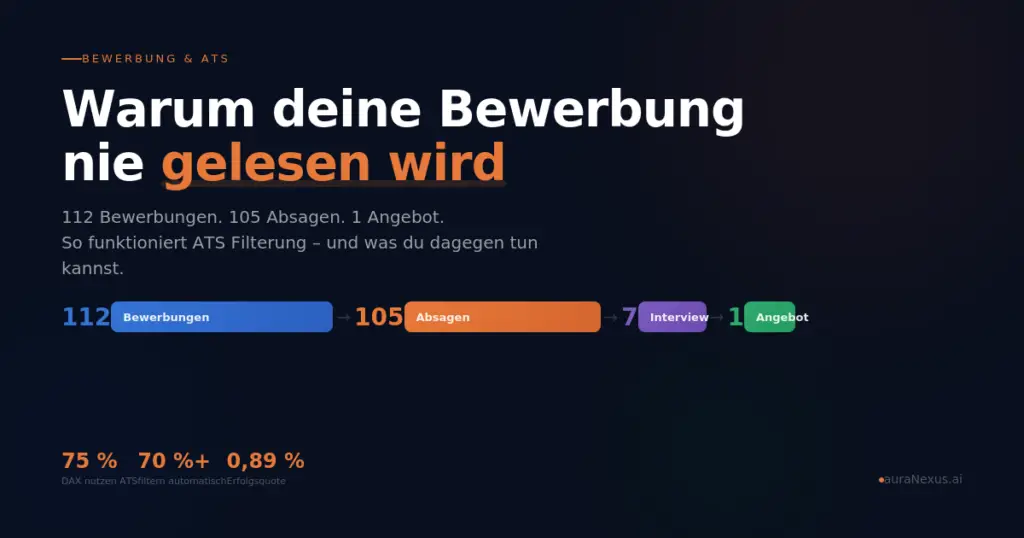
In mid-February 2026, a flowchart made its way through the media. A mechanical engineer with a doctorate, 31 years old, documented his application process on Reddit: 112 applications. 105 rejections or no response. 7 first interviews. 3 second interviews. 1 offer. Focus online picked up the story and identified the reason: ATS systems.
The interactive graphic shows the complete application process and explains how ATS filtering works.
If you are currently in a similar situation: This article explains what ATS is, how to check if your resume is the problem, and how to optimize it step-by-step.
What is ATS and why does it affect you?
ATS stands for Applicant Tracking System. It is software that automatically scans incoming applications, matches them with the job advertisement, and creates a ranking. Applications that show too little match are filtered out. A recruiter never sees them.
This is not a fringe phenomenon. Around 75 percent of DAX companies use ATS. In medium-sized businesses, the rate is 40 to 50 percent and continues to rise. Systems like Workday, SAP SuccessFactors, Personio, or Softgarden are widely used. If you apply to companies with more than 250 employees, it is highly probable that your application will first be read by software.
This means: Your resume must convince two readers. First the machine, then the human.
How to Check if Your Resume is ATS-Friendly
Before you start making changes, a quick self-test is worthwhile. Go through the following points. If more than two apply to your current resume, you should take action.
Your resume likely has an ATS problem if:
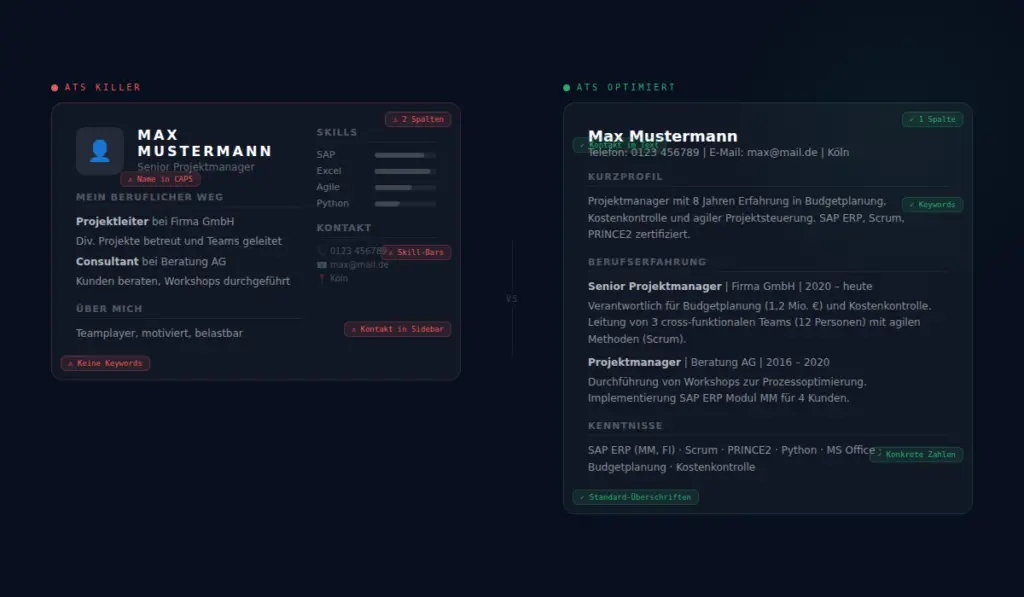
You use a Canva template or a creative template. Most designer templates use text boxes, columns, and graphics that ATS parsers cannot read. Your carefully designed resume arrives in the system as unreadable gibberish.
You have a two-column layout. ATS reads from top to bottom, not left to right. With columns, the software mixes up content from the left and right columns.
Your contact information is in the header or footer. Many ATS systems ignore these areas. Your phone number and email address will then be invisible to the system.
You use skill bars, stars, or graphics. The popular skill bars convey no information for ATS. The software cannot interpret graphics.
You have written your name in capital letters. ATS parsers often do not recognize “MAX MUSTERMANN” as a name because they process continuous capital letters differently.
You use the same resume for every application. ATS compares it with the specific job advertisement. Without the appropriate keywords from the job posting, your match score decreases.
You use abbreviations without explanation. “PMP” alone is not recognized by some systems. “Project Management (PMP certified)” is.
Your photo is embedded with text wrapping. In the DACH region, a photo is common, but if it disrupts the text flow, it can confuse the entire parser.
If several of these points apply to you: There’s no need to panic. The good news is that all these problems are solvable. And without your resume having to become boring.
Step-by-Step: How to Build an ATS-Friendly Resume
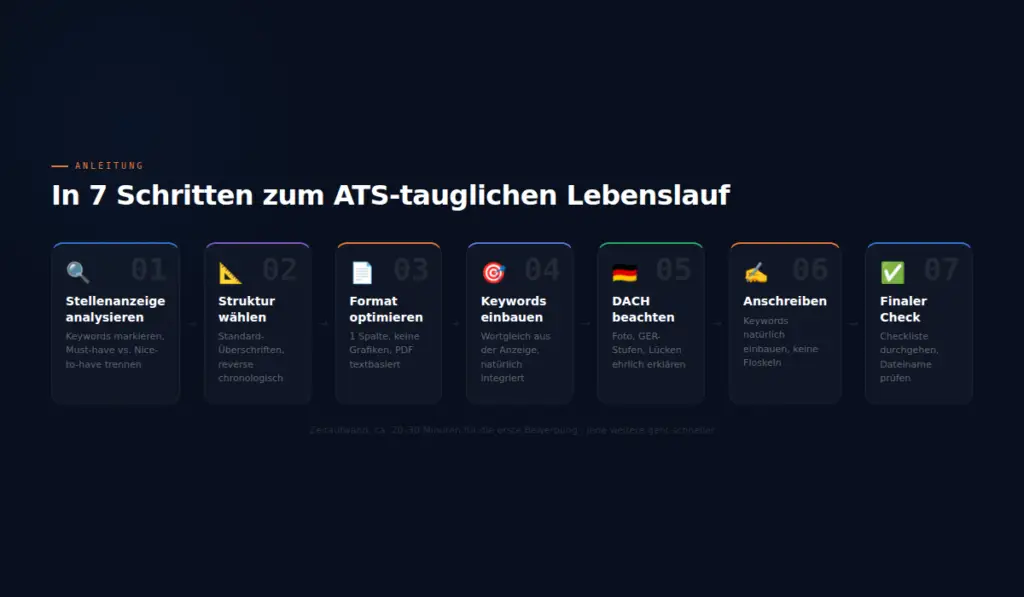
Step 1: Analyze the Job Advertisement
Before you touch your resume, read the job advertisement very carefully. Highlight all keywords: job title, technical terms, software skills, qualifications, methods. Pay attention to the exact wording. If the ad says “Projektmanagement” (project management), use “Projektmanagement” and not “Projektleitung” (project leadership) or “Projektsteuerung” (project control). ATS looks for exact matches.
Distinguish between must-have requirements (using phrases like “You bring with you” or “Prerequisite”) and nice-to-have requirements (identifiable by “ideally,” “desirable,” or “advantageous”). The must-haves must appear in your resume.
Step 2: Choose the Right Structure
ATS systems expect certain standard headings. Use this order:
Personal data (in the body text, not in the header or footer). Then a short profile with three to four sentences summarizing your most important qualifications. Followed by professional experience, in reverse chronological order, with the most recent position at the top. Education, skills, and further training follow.
Use these exact headings. Creative alternatives like “My Journey” or “Professional Milestones” are not recognized as professional experience by some ATS systems.
Step 3: Optimize the Format
Use a single-column layout. No tables, no text boxes, no embedded graphics. Calibri, Arial, or Helvetica in 10 to 12 points are suitable fonts. Use your word processor’s standard formatting for headings, not manual formatting.
Save as PDF, but as a text-based PDF, not a scan or image. Test it: If you can select and copy the text in the PDF, it is machine-readable.
The file name should correspond to your name and the position: FirstName_LastName_Resume_Company.pdf. No spaces, no special characters, no version numbers.
Step 4: Naturally Integrate Keywords
Adopt the keywords from the job advertisement verbatim into your resume. But integrate them naturally. For each position, describe specifically what you did, using the terms from the advertisement.
An example: The job advertisement requires “experience in budget planning and cost control.” Instead of “handled financial tasks,” write: “Responsible for budget planning (1.2 million Euros) and ongoing cost control for the department.” This way, the keywords appear, and you simultaneously provide concrete evidence.
Avoid keyword stuffing. Excessive repetition of terms is detected by modern ATS and negatively evaluated.
Step 5: Consider DACH Specifics
The German-speaking job market has its own conventions. A photo is still common in Germany, Austria, and Switzerland. Place it in the upper right without text wrapping so it doesn’t interfere with the parser. Date and place of birth are often expected.
Indicate language skills according to the Common European Framework of Reference: A1 to C2. “Fluent” or “basic knowledge” are less useful for ATS than the standardized level.
Explain time gaps honestly. Parental leave, further training, career reorientation: All of this is fine if you name it. An unexplained gap raises more questions than the gap itself.
Step 6: Don’t Forget the Cover Letter
The cover letter is also scanned by many ATS systems. Naturally integrate the most important keywords from the job advertisement without repeating the resume. The cover letter is your chance to explain why you are a perfect fit for this position. Keep it to a maximum of one page.
Avoid standard phrases like “I hereby apply” or self-descriptions like “team player” and “motivated” without concrete evidence. Instead, demonstrate what you bring with an example.
Step 7: Final Check
Before submitting, go through this checklist:
Is all contact information in the body text and not in the header or footer? Is the layout single-column? Are the headings standard? Do the most important keywords from the job advertisement appear? Is the PDF text-based? Is the file name correct? Have you written out abbreviations at their first occurrence?
Free ATS Coach: Your Personal Application Assistant
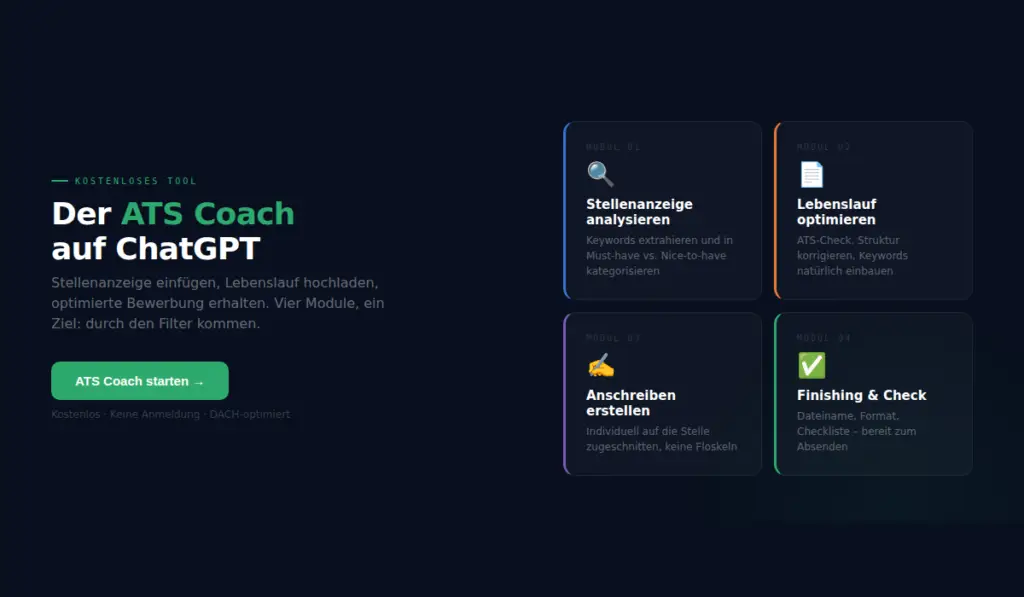
If that sounds like a lot of work: We’ve built a free tool specifically for this.
The ATS Coach is a GPT on ChatGPT that guides you through the entire process. You can insert a job advertisement, and the coach automatically extracts all relevant keywords and sorts them into must-have and nice-to-have. You can upload your resume, and the coach checks it for ATS compatibility and provides concrete suggestions for improvement. You can get support with your cover letter, with keywords naturally integrated into the text.
The GPT is specifically tailored to the DACH market. It understands the conventions for Germany, Austria, and Switzerland and operates in four modules: Job Ad Analysis, Resume Optimization, Cover Letter, and Finishing.
Important: The coach does not invent qualifications. It helps to present existing competencies in a way that ATS systems recognize them. Honesty always comes before optimization.
What You Can Do in the Next 30 Minutes
If you are actively looking for a job right now, here’s a concrete plan:
Open a job advertisement you want to apply for. Start the ATS Coach and paste the ad. Let it extract the keywords. Then upload your current resume and have it checked. In many cases, small adjustments are enough: standardize headings, add keywords, move contact information, change the format. The coach tells you exactly what to do.
This takes about 20 to 30 minutes for the first application. For each subsequent one, it will be faster because the basic structure is in place, and only the keywords need to be adjusted.
Frequently Asked Questions
What is ATS? ATS stands for Applicant Tracking System. It is software that automatically captures applications, scans for keywords, and pre-filters them before a recruiter sees them.
How many companies in Germany use ATS? Around 75 percent of DAX companies and 40 to 50 percent of medium-sized businesses. For companies with more than 250 employees, an ATS is now standard.
Can an ATS completely reject my resume? Yes. Applications with a low match score are automatically filtered out. In many companies, a recruiter only sees the top applications from the ranking.
Are Canva resumes ATS-compatible? In most cases, no. Canva templates use text boxes and columns that ATS parsers cannot reliably read. For applications to larger companies, we recommend a simple, single-column format.
Do I need to create a new resume for every job? Not completely new, but adapt it: yes. Adopt the keywords verbatim from each job advertisement. The basic structure remains the same; the keywords are exchanged.
How do I know if a company uses ATS? If you apply through an online portal where you enter your data into fields or upload documents, the company most likely uses an ATS. Larger career sites with their own application platform also indicate this.
Can I trick ATS systems, for example, with white text? We strongly advise against this. Hidden keywords, white text, or keyword stuffing are detected by modern ATS systems and lead to immediate rejection. Furthermore, a recruiter will notice it at the latest.
Does the ATS Coach also work for Austria and Switzerland? Yes. The GPT considers the specifics of all three DACH countries, including country-specific conventions for photos, dates of birth, and titles.
Is the ATS Coach really free? Yes. The ATS Coach is a public GPT on ChatGPT. You only need a free ChatGPT account.
What makes the coach different from other resume tools? The ATS Coach is not a template generator. It analyzes the specific job advertisement you provide, extracts the relevant keywords, and helps integrate them into your individual resume. All tailored to the application conventions in the DACH region.
Get started now
Do you want to make your resume ATS-friendly? Start with a specific job advertisement and let the ATS Coach do the work. Free, no registration required via ChatGPT.
Are you an HR manager or head of HR wondering if your ATS is letting the right candidates through? At auraNexus.ai, we develop AI solutions that make recruiting processes fairer and more efficient. Let’s talk.
Post Tags :
Share :
ATS Application, Optimize ATS Resume, Applicant Tracking System Germany, ATS-Compatible Resume, Free ATS Coach GPT, Application Automatically Rejected, Optimize Resume Keywords, Bypass ATS Filter, Canva Resume ATS Problem, Job Application DACH Region, ATS Resume Check, Job Application Tips 2026, ATS-Friendly Resume Format, ATS Keyword Matching, Application Not Read
More articles on this topic
Individual instructions for AI. How to optimally use ChatGPT and Claude to achieve better results.
AI Governance thought pragmatically. How to introduce AI guidelines without stifling innovation.
AI Consulting & Training. Professional AI training for your team – from strategy to implementation.
AI Projects: HR & Recruiting. AI solutions for job advertisements, onboarding, and employer branding.